User guide
(Version 1.0 - February 2026)
This guide will help you install and configure Rumble Garage engine vibration profiles for the ©SimHub software. Follow these steps to get the most out of your bass shakers.
1. Prérequisites
Before installing the engine vibration profiles, ensure you have the following items:
Recommended hardware configuration
|
Component |
Specification |
|
Bass Shaker 50 W (minimum) |
1 bass shaker attached to the seat back |
|
Bass Shakers 50W + 50W (recommanded) |
2 bass shakers (back + seat) for optimal sensations |
|
Amplifier |
Amplifier Amplifier compatible with your bass shakers |
Important note: A second bass shaker installed under the seat cushion allows you to increase the sensations tenfold and exploit the full potential of the profiles developed.
Software configuration
· SimHub installed (version 9.0 or higher recommended)
· Shakelt Bass Shaker module enabled in SimHub
· Audio drivers and amplifier correctly configured
· Compatible simulation game: Le Mans Ultimate, ACC, Assetto Corsa + Mods GT- M @Race Sim Studio
2. Profile installation
Installing the engine vibration profiles is quick and easy. Follow these steps in order:
Step 1: Extracting the file
1. Locate the downloaded ZIP file containing the .siprofile profile
2. Extract the contents to a temporary folder of your choice
Step 2: Import into SimHub
3. Launch SimHub
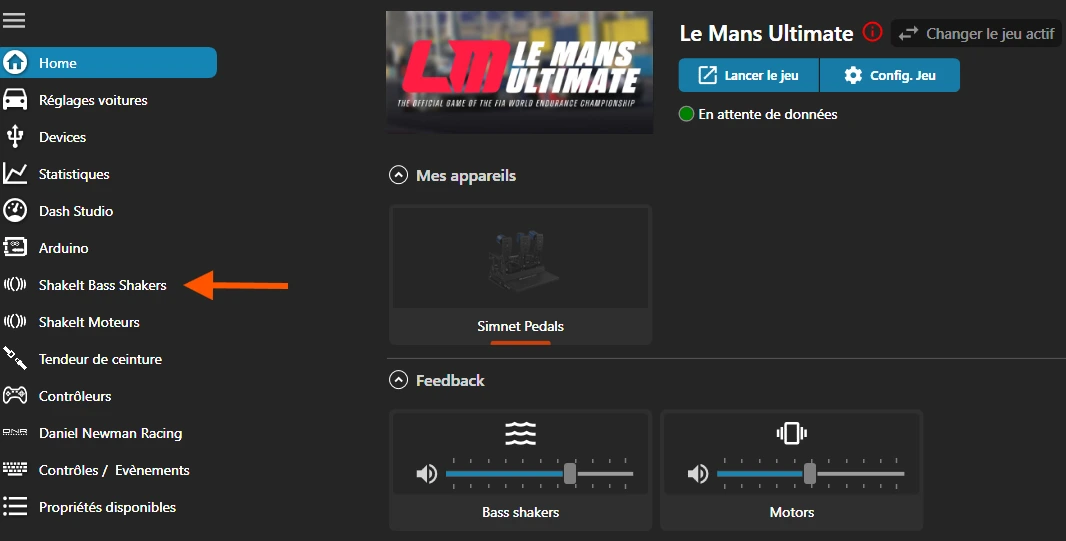
4. Go to the "Shakelt Bass Shakers" tab in the main menu
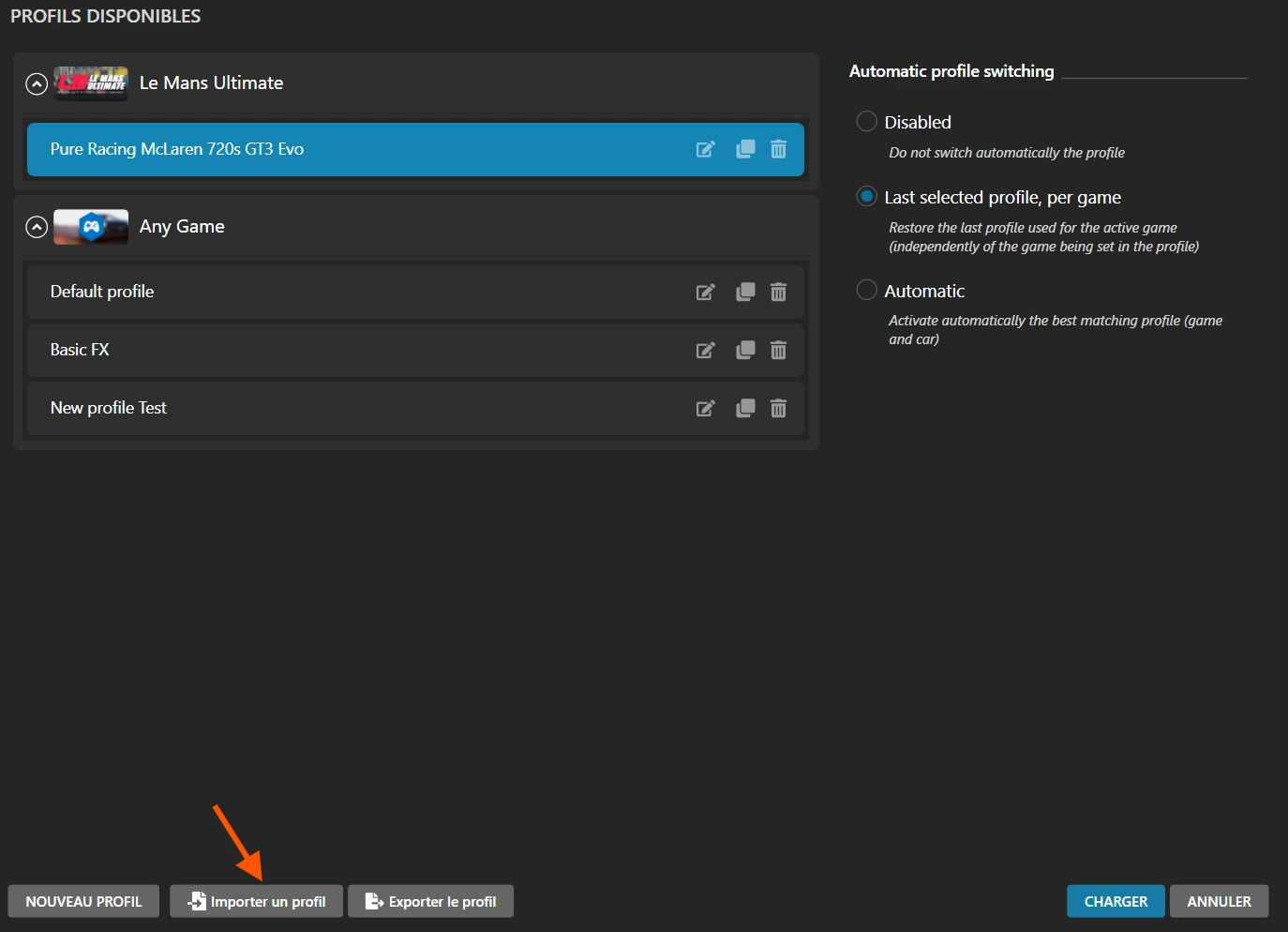
5. Click on the "Profile Manager" button
6. Click on the "Import Profile" button
7. Navigate to the .siprofile file you extracted earlier
8. Select the file and click "Open"
9. SimHub will automatically load the profile with all its settings
Step 3: Verification
Once the profile has been imported, check that:
10. The profile name appears in the list of available profiles
11. The engine vibration effects (RPMS) are listed and enabled
12. Your bass shakers are correctly assigned in the configuration
Tip: If the profile does not appear, check that the Shakelt Bass Shaker module is enabled in the SimHub settings.

3. Recommended settings
To get the most out of the engine vibration profiles, here are the recommended volume settings:
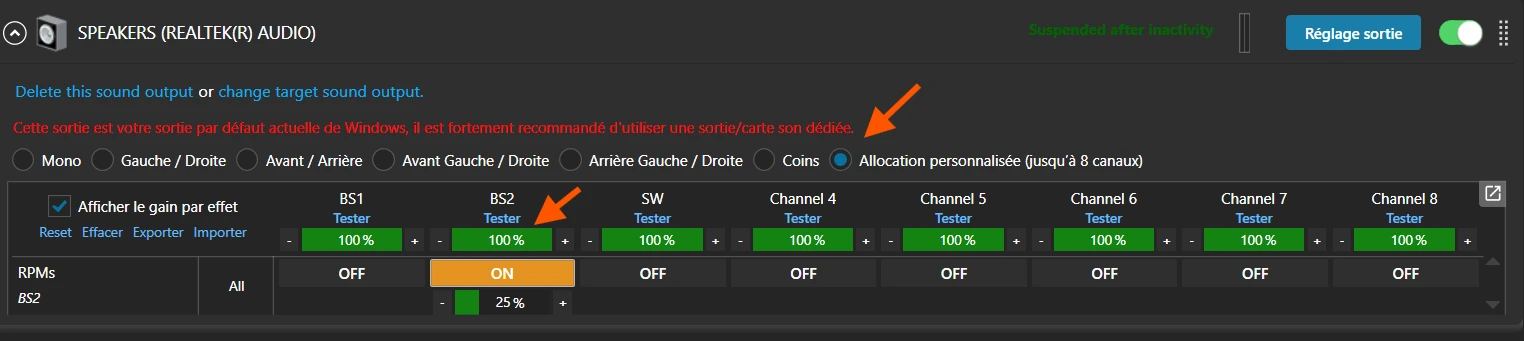
Single bass shaker configuration (folder) - BS2
If you have a single bass shaker attached to the seat back:
· In the "Sound Output" tab, assign the RPMs BS2 engine effect to the main bass shaker.
· Set the starting gain to 40-50%.
· l Set the overall gain of the Pure effect between 50% and 70% depending on the power of your equipment
· Enable all the effects contained in the downloaded vehicle folder
· Disable other redundant effects to avoid saturation
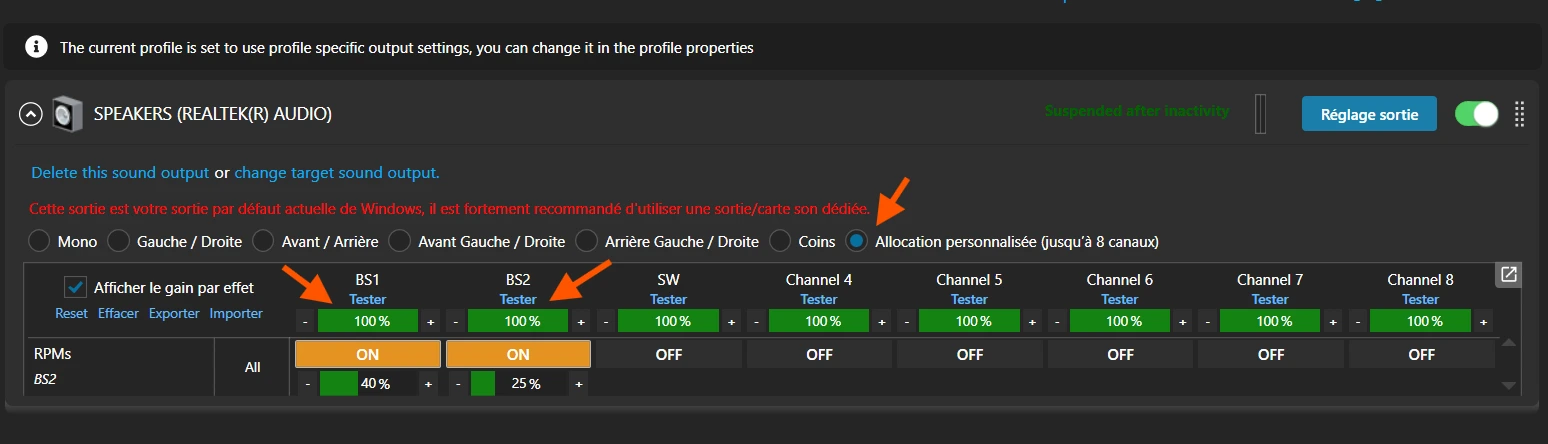
Dual bass shaker configuration (folder + seat) - BS2 + BS1
Optimal configuration to exploit the full potential of the profiles:
· In the "Sound Output" tab, assign the BS2 RPM engine effect to the main and secondary bass shakers.
· et a starting gain of 40 to 50% on the BS2 Bass Shaker and 20 to 30% on the BS1 Bass Shaker
· l Set the overall gain of the Pure effect between 50% and 70% depending on the power of your equipment
· Enable all the effects contained in the downloaded vehicle folder
· Disable other redundant effects to avoid saturation
· This separation recreates the realistic feel of the engine.
4. Usage
Activating the profile
1. Launch SimHub before starting your simulation game.
2. Check that the profile is selected (drop-down list at the top of the Shakelt tab).
3. Engine vibrations will activate automatically once on the track.
4. The effects react in real time according to the vehicle's engine speed.
Expected sensations
Here is what you should feel with the profile correctly configured:
Idle : Light, low-frequency vibrations, feeling of the engine at rest
Bas régimes : Progressive vibrations, engine beating
Moyens régimes : power build-up Intense, rapid vibrations, feeling of power
Hauts régimes : Increasing intensity, power build-up Intense, rapid vibrations, feeling of power
Limiteur : Distinctive vibration indicating the red zone
5. Optimisation and adjustments
Each hardware configuration is unique. Here's how to optimise the profile according to your preferences:
Adjusting the overall gain
· Too low:The vibrations are barely perceptible → Increase by 5-10%
· Optimal:The vibrations are clear without distortion
· Too high:Confused vibrations, clipping noise → Decrease by 5-10%
Any changes made to frequencies and volumes overwrite the file presets without the possibility of reverting to the original version!!
6. Troubleshooting
Solutions to the most common problems:
|
Problem |
Solution |
|
No vibration |
Check: SimHub running, profile activated, bass shakers connected, amplifier on, game detected by SimHub |
|
Vibrations too weak |
Increase the overall gain or the amplifier volume. Check the attachment of the bass shakers |
|
Saturated vibrations |
Reduce the overall gain in SimHub. Check that the amplifier is not clipping |
|
Offset effects |
Restart SimHub and the game. Check that the game plugin is enabled in SimHub |
|
Only one bass shaker is working |
Check the assignment of effects to audio outputs in the ShakeIt settings |
Performance optimisation
· Close unnecessary applications to free up resources
· Disable non-essential effects if you notice slowdowns
· Update SimHub regularly to benefit from fixes
· Check that your audio drivers are up to date
Thank you for choosing these engine vibration profiles. We hope they will significantly enhance your simulation experience.
Enjoy your game!
_______________
© 2026 - All rights reserved